Learn how to add Continuing Education (CE) credit for a passed exam.
TIP: CE credits will not be reported unless your current state license or NPN is on file before you test.
What You Need to Do:
Before You Test
- Log in to your account
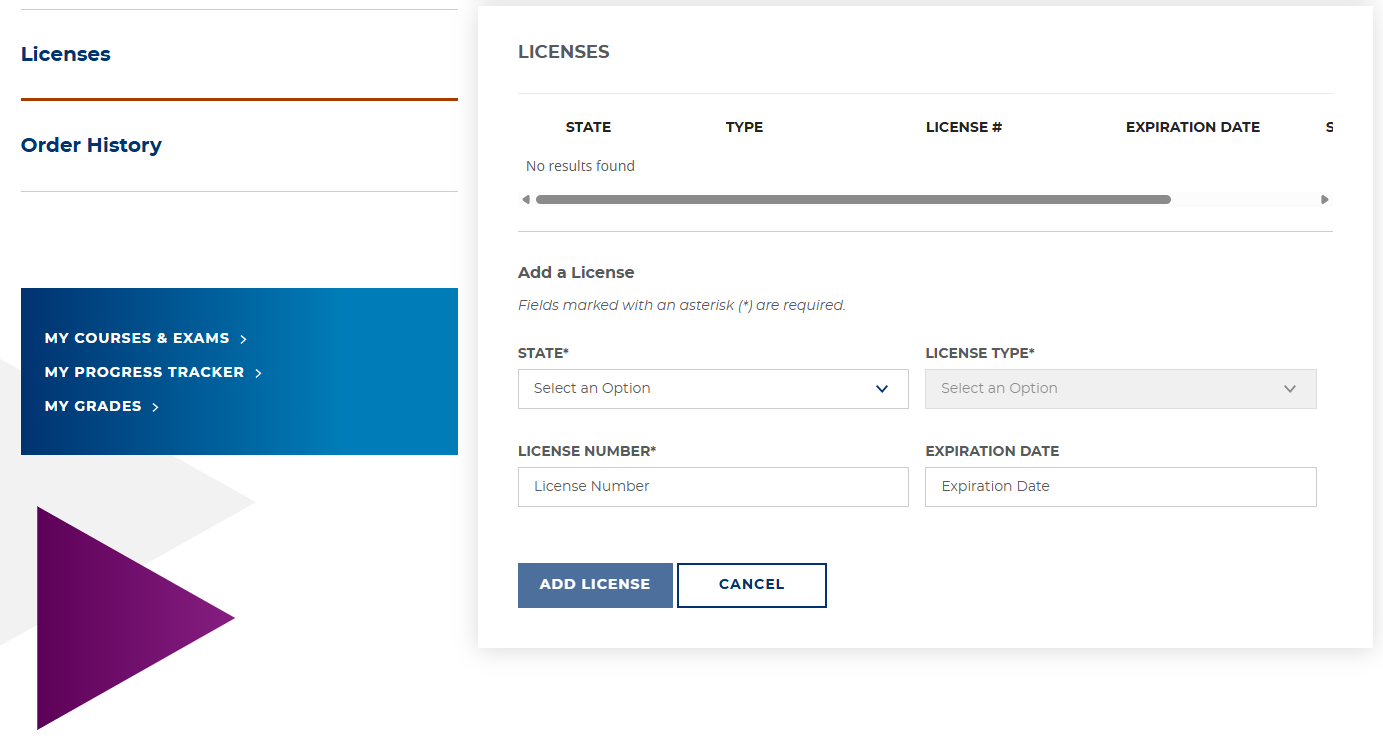
- Go to My Account → My Profile → Licenses
- Enter your state license number and/or NPN
- Save your changes before you begin your exam
If You Already Tested
If you tested without license/NPN information on file and CE was not reported, add your license/NPN to your profile. Then contact Customer Success for next steps.
TIPS:
- Some states do not allow late CE reporting. Any late-reporting fees (if permitted) are the student’s responsibility.
- If you test onsite in a state that requires live proctoring for CE, It is your responsibility to ensure the testing center and proctor meet all state CE requirements.
Still need help? Submit a request using the Request Help button in the upper right corner of your screen, and our Customer Success team will assist you.
Was this article helpful?
That’s Great!
Thank you for your feedback
Sorry! We couldn't be helpful
Thank you for your feedback
Feedback sent
We appreciate your effort and will try to fix the article